OneDrive vs Google Drive: Which Is Better in 2026?
OneDrive vs Google Drive compared — free storage, pricing, security, and which to pick based on whether you use Microsoft 365 or Google Workspace.
The honest answer to OneDrive vs Google Drive is that neither is objectively better — and anyone telling you otherwise is probably already committed to one ecosystem. The real question is which one fits how you already work.
If you use Windows and pay for Microsoft 365, OneDrive is already sitting on your computer and your 1TB of storage is included in what you’re paying. If you live in Gmail and Google Docs, Google Drive is the same. The decision is rarely about features. It’s about which tech company’s orbit you’re already in. That said, there are meaningful differences in free storage, pricing structure, and the specific ways each platform handles security, collaboration, and file access. Here’s what actually matters.
OneDrive vs Google Drive: Quick Comparison
| OneDrive | Google Drive | |
|---|---|---|
| Free storage | 5GB | 15GB |
| Personal paid (100GB) | $1.99/month | $1.99/month |
| Personal paid (1TB) | $9.99/month (Microsoft 365 Personal — includes Office apps) | $9.99/month (Google One Premium — storage only) |
| Personal paid (2TB) | $12.99/month (Microsoft 365 Family, up to 6 users) | $9.99/month |
| Business entry | $6/user/month (1TB + Office apps) | $7/user/month (30GB only) |
| Integrated apps | Word, Excel, PowerPoint, Outlook | Docs, Sheets, Slides, Gmail |
| File size limit | 250GB per file | 5TB per file |
| Encryption | AES-256 in transit and at rest | AES-256 in transit and at rest |
| OS integration | Built into Windows; macOS app available | Browser-first; desktop app available |
| Best for | Microsoft 365 users, Windows, business teams | Google Workspace users, Gmail, casual personal use |
Free Storage: Google Drive Wins Clearly
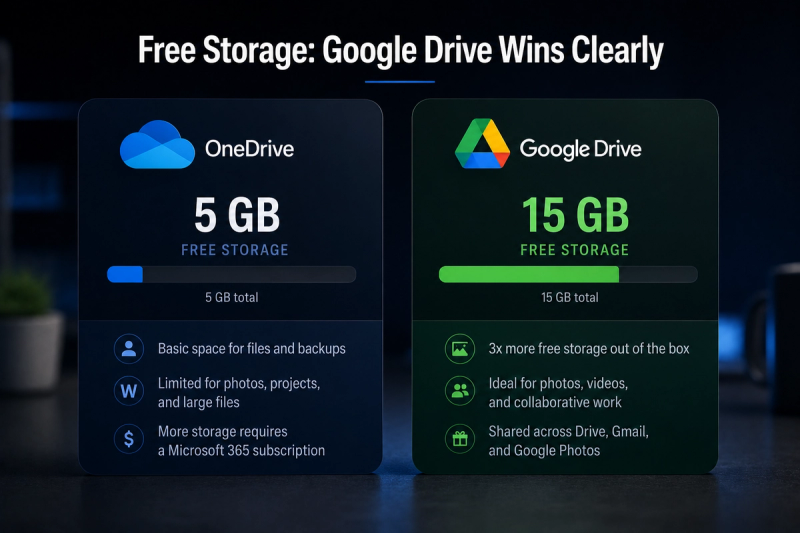
Google Drive gives 15GB free versus OneDrive’s 5GB — a significant difference for casual users. 15GB covers years of documents, spreadsheets, and moderate photo backup before you hit the wall. OneDrive’s 5GB fills up fast, especially if you back up phone photos automatically.
One nuance: Google spreads your 15GB across Google Drive, Gmail, and Google Photos. If your Gmail inbox is full of attachments, that eats into your Drive space. OneDrive’s 5GB is separate from your Outlook storage, which gets an additional 15GB. For most people who want free cloud storage and nothing else, Google Drive is the better starting point.
Pricing: It Depends What You’re Comparing
This is where most comparisons go wrong by treating the two services as direct equivalents. They’re not priced the same way.
Personal plans
At $9.99/month, the two services split sharply: Google One provides 2TB of storage versus Microsoft’s 1TB — but Microsoft bundles full desktop Office apps with that 1TB. If you already pay for Word, Excel, and PowerPoint, Microsoft 365 Personal at $9.99/month effectively gives you those apps plus 1TB of storage. If you only need storage and use Google Docs instead of Office, Google One’s 2TB at $9.99/month is the better deal.
Business plans
OneDrive dominates for businesses. Microsoft 365 Business Basic runs $6/user/month with 1TB of storage per person. Google Workspace Starter costs $7/user/month with only 30GB per user. To get comparable storage on Google’s side, you’d need the Business Standard plan at $14/user/month for 2TB pooled. For most small businesses, OneDrive’s business pricing is hard to beat.
Family plans
Microsoft 365 Family at $12.99/month gives 6TB for up to 6 people plus Office apps. Google One at the same price gives 2TB for up to 5 people. For families who use Office, Microsoft’s family plan is substantially better value.
Integration: Which Ecosystem Are You In?
This is the deciding factor for most people. OneDrive is built into Windows. Files sync automatically to your desktop, and saving from Word, Excel, or PowerPoint goes straight to OneDrive by default. If you work primarily on a Windows PC and use Microsoft 365, OneDrive requires almost no setup — it’s just there.
Google Drive assumes you work in a browser. Google Docs, Sheets, and Slides all save directly to Drive, and Gmail integration means attachments are a click away from your storage. On Android phones, Google Photos backs up automatically. On iPhone and Windows, you need the desktop app or browser access. The practical upshot: if you use Office apps on Windows, OneDrive will feel invisible in the best way. If you use Google’s apps or have an Android phone, Google Drive will feel the same way. Switching against your ecosystem creates friction that no feature list will fix.
Collaboration: Closer Than You’d Think
Both platforms support real-time collaborative editing. Google pioneered this and it remains slightly smoother for browser-based work. OneDrive’s collaboration through Microsoft 365 has caught up significantly and works well for Office documents.
The difference shows up at the edges. Google Drive’s sharing is fast and browser-native — share a link and anyone with a Google account can jump in immediately. OneDrive’s sharing works well within Microsoft 365 organisations but can feel more cumbersome when sharing externally with people who don’t use Microsoft accounts.
Security: Both Are Solid, With Different Trade-offs
Both OneDrive and Google Drive use AES-256 encryption in transit and at rest, and both support two-factor authentication. At the infrastructure level, you’re getting comparable security from two of the world’s largest cloud providers.
The difference is in how each company handles your data. Google’s business model is built on advertising and data analysis — while Google doesn’t scan Drive files for ad targeting, the broader Google ecosystem collects significantly more behavioural data than Microsoft does. Microsoft’s revenue model is more enterprise-software focused, which means less incentive to monetise your file data. For most personal users this distinction is theoretical. For business users handling sensitive data, it’s worth reviewing each company’s data processing agreements before committing.
Neither platform offers end-to-end encryption by default — both companies can technically access your files if required by law enforcement. If zero-knowledge encryption is a requirement, look at Proton Drive or Sync.com instead. See our best cloud storage services guide for those options. Whatever platform you choose, enable two-factor authentication and use a password manager — these matter more than which cloud service you pick.
OneDrive vs Google Drive: Which Should You Choose?
| Choose OneDrive if… | Choose Google Drive if… |
|---|---|
| You use Windows as your primary OS | You live in Gmail, Google Docs, or Google Sheets |
| You pay for Microsoft 365 — storage is already included | You want the most free storage without paying anything |
| You run a small business needing 1TB per user at low cost | You need more than 1TB of personal storage at $9.99/month |
| Your family needs Office apps plus storage on one plan | You work primarily in a browser rather than desktop apps |
| You work heavily in Word, Excel, or PowerPoint | You use an Android phone and want automatic photo backup |
The Verdict
For personal use with no existing commitment to either platform, Google Drive is the better starting point — 15GB free, competitive paid pricing, and browser-first access that works anywhere.
For anyone paying for Microsoft 365 — which covers most Windows users and small businesses — OneDrive is already the right answer. The storage is included, Office integration is seamless, and the business pricing is significantly better than Google’s equivalent plans.
For a full comparison of all cloud storage options including Dropbox, iCloud, and privacy-first alternatives, see our best cloud storage services guide.