What Is a VPN Router? How It Works, What It Costs and Whether You Need One in 2026
A VPN router encrypts traffic for every device on your network at once. Here's how it works, how much speed you lose, what it costs and how to set one up.
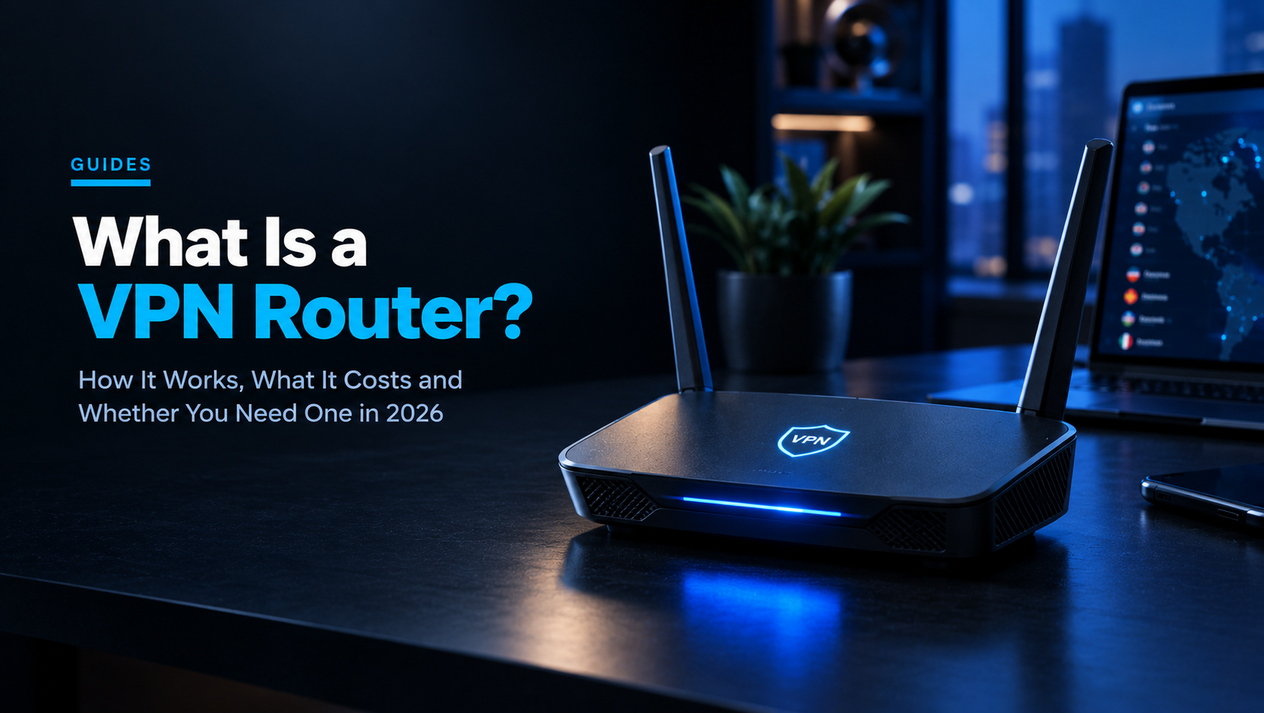
A VPN router is a router that runs the VPN connection itself, so every device on your Wi-Fi — phones, laptops, smart TVs, games consoles, streaming sticks and smart speakers — is encrypted automatically without installing a single app. It is the only practical way to put a VPN on devices that cannot run VPN software, and it lets one subscription cover dozens of devices.
It is not right for everyone, though. A VPN router can slow your whole connection, it only protects you at home, and it can break banking apps and streaming services for everyone in the house. This guide explains how VPN routers work, the four types you can buy, how much speed you will really lose, seven routers worth considering, step-by-step setup for ASUS and GL.iNet, and the problems you are most likely to hit. If you are new to VPNs entirely, start with our explainer on what a VPN is and whether you need one.
What Is a VPN Router?
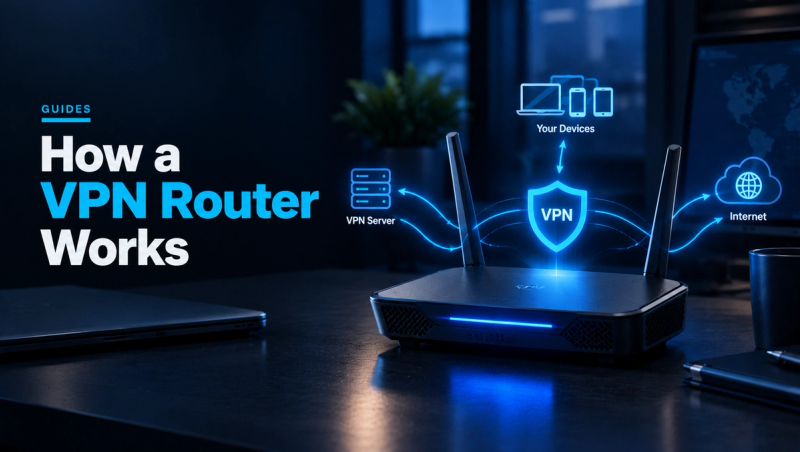
Any router that can act as a VPN client counts as a VPN router. Instead of each device opening its own encrypted tunnel to a VPN server, the router opens one tunnel and sends the traffic of every connected device through it. Devices do not know a VPN is involved; they simply see a normal Wi-Fi network.
Router settings often show two VPN features that do opposite jobs, and mixing them up is the most common source of confusion:
- VPN client mode: the router connects out to a commercial VPN service such as NordVPN, Surfshark or Proton VPN. This is what people mean by a VPN router, and it is what this guide covers.
- VPN server mode: the router accepts incoming connections so you can reach your home network while travelling — for example to open files on a home NAS. It does not hide your traffic from your internet provider.
How a VPN Router Works, Step by Step
- Your device sends a request — say, to load a website — to the router over Wi-Fi or Ethernet, exactly as it normally would.
- The router encrypts that request using a VPN protocol, usually WireGuard or OpenVPN.
- The encrypted data travels through your internet provider to the VPN server. Your provider can see that you are connected to a VPN, but not which sites you visit.
- The VPN server decrypts the request and forwards it to the website, using the server's IP address instead of yours.
- The reply comes back the same way, and the router hands it to your device.
Because one tunnel carries everything, the router's processor does all the encryption work for the whole household. That single fact explains most of the speed differences between VPN routers, which we cover below.
The 4 Types of VPN Router
1. Routers With a Built-In VPN Client
Many mainstream routers from ASUS, GL.iNet, TP-Link and Cudy can run a VPN client from their normal settings page. You upload a configuration file from your VPN provider and switch it on. This is the easiest and safest route for most people, and you may already own one — check your router's settings for a VPN or "VPN client" menu before buying anything.
Good for: most homes. Watch out for: cheap models with weak processors that crawl once the VPN is on.
2. Pre-Configured Provider Routers
Some VPN companies sell or partner on plug-and-play routers that work only with their service, such as NordVPN's Privacy Hero 2 and ExpressVPN's Aircove. Setup is a login rather than a config file. The trade-off is lock-in: if you change VPN provider, the router loses its main feature, and both products have firmware end-of-support dates to check before buying. ExpressVPN's Aircove has also been out of stock for months.
3. Routers Flashed With Custom Firmware
Open-source firmware such as OpenWrt, DD-WRT and AsusWRT-Merlin unlocks advanced VPN features on supported routers: per-device and per-website routing, multiple tunnels and detailed kill-switch rules. It is powerful, but flashing firmware can void your warranty, and a mistake can leave the router unusable. Only go this way if you are comfortable troubleshooting networks.
4. Travel VPN Routers
Pocket-sized routers such as GL.iNet's Beryl AX and Slate 7 connect to hotel, café or Airbnb Wi-Fi and create your own private network on top of it, already running through the VPN. Every gadget you travel with connects once to your own network name and is protected everywhere. They are also handy for devices like a travel streaming stick that has no VPN app.
VPN Router vs VPN App
| VPN router | VPN app | |
|---|---|---|
| Devices covered | Everything on your Wi-Fi | Only devices with the app installed |
| Smart TVs, consoles, smart home | Yes | Usually no |
| Protection away from home | No (unless it is a travel router) | Yes |
| Extra cost | $40–$250 hardware | None beyond the subscription |
| Speed limit | Router CPU | Device and server |
| Per-app control | Needs advanced firmware | Easy split tunnelling |
| Counts against device limit | Usually as one device | One per device |
| Setup | Once, 10–30 minutes | On every device |
Most people who buy a VPN router keep apps on their phones and laptops too, for protection outside the house. Just avoid running an app on a device that is already connected through the VPN router: stacking two tunnels slows things down and adds no meaningful privacy.
7 Reasons to Use a VPN Router
- Devices that cannot run VPN apps. Most smart TVs, PlayStation and Xbox consoles, many streaming sticks and almost all smart home gadgets have no VPN app. A router is the only simple way to cover them.
- Getting around device limits. NordVPN allows 10 simultaneous connections and Proton VPN Plus also allows 10. A router normally counts as one connection while covering every device behind it. (Surfshark already allows unlimited devices, so this matters less there.)
- Always-on protection. Nobody has to remember to switch a VPN on, and family members cannot forget or disable it.
- Guests are covered automatically. Anyone who joins your Wi-Fi gets the same protection without installing anything.
- Hiding smart-home traffic from your internet provider. Smart TVs and speakers constantly contact their makers' servers. A VPN router hides which services they talk to from your provider (though not from the device makers themselves).
- Safer public Wi-Fi while travelling. A travel router wraps untrusted hotel Wi-Fi in an encrypted tunnel for every device you carry.
- A dedicated "VPN network" alongside a normal one. Many routers can run a second Wi-Fi network that goes through the VPN while the main one does not. Devices that need a VPN join one network; everything else joins the other.
6 Downsides to Know Before You Buy
- Slower internet for everyone. The router's processor caps VPN speed for the whole home. On a weak router this can mean a fraction of your plan's speed.
- Some services stop working. Banking apps may flag the foreign or data-centre IP address, some streaming services block VPN servers, and online games may see higher ping.
- All-or-nothing routing on basic firmware. Cheaper routers send every device through the tunnel. Excluding a smart TV or work laptop needs better firmware.
- Silent failures. If the tunnel drops, devices may quietly fall back to your normal connection. You need a kill switch to prevent this.
- No protection outside the house. Your phone on mobile data or café Wi-Fi still needs its own VPN app.
- More to maintain. Router firmware needs updating, and when something breaks, the whole household is affected.
How Much Speed Will a VPN Router Cost You?
VPN speed on a router is limited by its CPU, not its Wi-Fi standard. A Wi-Fi 7 router with a weak processor can still be slow through a VPN. The protocol you choose matters even more.
WireGuard vs OpenVPN on a Router
| WireGuard | OpenVPN | |
|---|---|---|
| Speed on router hardware | Fast — roughly 600–900 Mbps on strong routers, 150–350 Mbps on budget ones | Slow — OpenVPN-only setups can lose 60–75% of line speed |
| Older Wi-Fi 5 routers | Usually usable | Can drop to 30–40 Mbps |
| Reconnects after drops | Quickly | More slowly |
| Provider support for routers | Most major providers, some via app integration only | Almost universal |
| When to use | Default choice | Only if WireGuard is unavailable |
A Worked Example
Say you pay for 500 Mbps fibre. On a budget router that manages around 200 Mbps over WireGuard, every device in the house now shares 200 Mbps — still enough for several 4K streams, but downloads take more than twice as long. On a GL.iNet Flint 2, which can reach close to 900 Mbps over WireGuard in good conditions, you would keep most of your 500 Mbps. If your plan is 100 Mbps or less, almost any WireGuard-capable router is fast enough. Real results also depend on how far away the VPN server is and how busy it is.
7 VPN Routers Worth Considering in 2026
Prices are typical US street prices checked in October 2026; speeds are vendor claims or best-case estimates, so treat them as a ranking rather than a guarantee.
| Router | Price | VPN support | Approx. WireGuard speed |
|---|---|---|---|
| Cudy WR3000 | About $40–$50 | WireGuard, OpenVPN, IPsec | 150–250 Mbps |
| GL.iNet Beryl AX (travel) | About $99 | 30+ providers, WireGuard, OpenVPN | 300–400 Mbps |
| ASUS RT-BE58U | About $110–$130 | WireGuard, OpenVPN (VPN Fusion) | 200–350 Mbps |
| GL.iNet Flint 2 | About $170 | 30+ providers, WireGuard, OpenVPN | Up to ~900 Mbps |
| GL.iNet Flint 3 | About $180–$210 | 30+ providers, Wi-Fi 7 | ~640–680 Mbps |
| NordVPN Privacy Hero 2 | About $190 | NordVPN only | 200+ Mbps |
| ASUS RT-BE86U | About $220–$250 | WireGuard, OpenVPN (VPN Fusion) | 300–500 Mbps |
1. Cudy WR3000 — Cheapest Way to Try It
At around $40–$50, the Cudy supports WireGuard, OpenVPN and IPsec out of the box. Expect roughly 150–250 Mbps through the tunnel, which is fine for plans up to about 200 Mbps. Best for small flats and anyone experimenting before spending more.
2. GL.iNet Beryl AX — Best Travel VPN Router
Palm-sized and USB-C powered, it connects to hotel Wi-Fi and gives all your devices a private, VPN-protected network. GL.iNet's interface supports more than 30 VPN providers and makes the kill switch a single toggle.
3. ASUS RT-BE58U — Best Budget Home Router
A Wi-Fi 7 router whose VPN Fusion feature lets you choose which devices use the VPN, with no custom firmware required. VPN speeds of around 200–350 Mbps suit most home plans.
4. GL.iNet Flint 2 — Best Overall
The strongest all-rounder: a powerful processor that can push close to 900 Mbps over WireGuard, support for 30+ providers, per-device policies and an OpenWrt base for advanced users. The pick if you have fast fibre and want to keep most of it.
5. GL.iNet Flint 3 — Best Wi-Fi 7 Option
Adds Wi-Fi 7 and 6 GHz for faster local speeds, with VPN throughput around 640–680 Mbps — slightly below the Flint 2 through the tunnel, but better for homes with many new Wi-Fi 7 devices.
6. NordVPN Privacy Hero 2 — Easiest Setup
Sign in with your NordVPN account and you are done. It only works with NordVPN, so it suits people who are sure they will stay with that provider.
7. ASUS RT-BE86U — Best for Gamers
Gaming-focused traffic prioritisation plus VPN Fusion, so you can keep your console off the VPN for low ping while laptops and TVs stay protected. VPN speeds of around 300–500 Mbps.
How to Set Up a VPN Router
On an ASUS Router (VPN Fusion)
ASUS supports WireGuard in VPN Fusion on firmware newer than 3.0.0.4.388.23000, so update first.
- Download a WireGuard configuration file from your VPN provider's website for the server location you want.
- Go to www.asusrouter.com (or your router's IP address) and sign in.
- Open VPN > VPN Fusion and click Add profile.
- Click Upload Config and choose the WireGuard file.
- Use the Device icon to pick which devices should use the VPN, then click Apply all settings.
- Click the profile to connect.
On a GL.iNet Router
- Open 192.168.8.1 in a browser and sign in.
- Go to VPN > WireGuard Client (or OpenVPN Client).
- Choose your provider from the built-in list and sign in, or upload a configuration file manually.
- Pick a server and connect.
- In the VPN dashboard, turn on Block Non-VPN Traffic — GL.iNet's kill switch.
Test That It Is Working
From any device on the network, visit an IP-checking site and confirm it shows the VPN server's location, then run a DNS leak test to make sure DNS requests are not going to your internet provider. Finally, disconnect the VPN on the router and check that devices lose internet access rather than falling back to your real connection — that confirms your VPN kill switch is doing its job.
Which VPN Services Work Best on a Router?
| VPN | Simultaneous devices | Router notes |
|---|---|---|
| NordVPN | 10 | Works via manual OpenVPN files, built-in integrations on routers like GL.iNet, or the Privacy Hero 2 |
| Surfshark | Unlimited | Lets you generate WireGuard and OpenVPN configs for manual router setup |
| Proton VPN | 10 (Plus) | Provides WireGuard and OpenVPN configs for routers |
| ExpressVPN | Varies by plan | Aircove router or OpenVPN files; check current plan limits |
Free VPNs rarely support routers, and the few that do usually cap speed or data. If you are choosing between the two most popular paid services, our Surfshark vs NordVPN comparison covers speed and price, and our guides to whether NordVPN is worth it and Surfshark's real price after renewal show what you will pay after year one.
Using a VPN Router for Streaming, Gaming and Smart Homes
Streaming
A VPN router makes your smart TV appear to be in the VPN server's country, which can change the catalogue you see. It can also trigger "proxy detected" errors. If one service misbehaves, exclude the TV from the VPN rather than switching it off for the whole home.
Gaming
Every extra hop adds latency. For competitive online games, keep consoles off the VPN or connect to the nearest server. Some players use a VPN router to reach a less crowded region, but expect higher ping.
Smart Home Devices
Casting, AirPlay and local smart-home discovery can break when some devices are on the VPN and others are not, because they rely on sharing the same local network. Keep devices that need to find each other on the same side of the tunnel.
5 Common VPN Router Problems and How to Fix Them
- Internet is much slower: switch from OpenVPN to WireGuard, pick a closer server, and check the router's CPU load in its status page.
- Banking or streaming apps refuse to load: exclude that device using VPN Fusion, GL.iNet policies or a separate non-VPN Wi-Fi network.
- No internet after the VPN drops: that is the kill switch working. Reconnect the profile or choose another server.
- DNS leak test shows your provider: set the router to use the VPN's DNS servers, or enable "override DNS" in the VPN client settings.
- Devices cannot connect at all: disable the VPN to confirm the router itself works, then work through our Wi-Fi not working fix guide.
VPN Router FAQs
Is it legal to use a VPN router?
In the US, UK, EU and most other countries, yes. A few countries restrict or ban VPNs. What you do through the VPN is still subject to the law and to each service's terms.
Can I put a VPN on the router my internet provider gave me?
Usually not — most provider-supplied routers lack VPN client support. The common fix is to plug your own VPN-capable router into the provider's box and connect your devices to yours.
Can I use a free VPN on a router?
Rarely. Most free VPNs do not provide router configuration files, and those that do usually limit speed or data, which a whole household will exhaust quickly.
Does a VPN router protect against viruses and hackers?
Not directly. It encrypts traffic and hides your IP address, but it does not stop malware you download or phishing links you click. Some VPNs add malicious-site blocking, but you still need security updates and good habits.
Will a VPN router slow down my Wi-Fi?
It slows your internet connection, not your local Wi-Fi. Copying files between devices at home stays at full speed; only traffic going out to the internet passes through the tunnel.
Do I still need VPN apps on my phone?
Yes, if you want protection away from home. See our pick of the best VPN for iPhone for mobile options.
The Verdict: Do You Need a VPN Router?
Most people do not. If you mainly want privacy on a phone and laptop, VPN apps are cheaper, work everywhere and are easier to switch off when an app objects. A VPN router earns its place if you want to cover a smart TV or console, have more devices than your VPN plan allows, want everyone at home protected without relying on them to switch an app on, or travel with several gadgets. For most of those buyers, a WireGuard-capable router from GL.iNet or ASUS in the $100–$170 range is the sweet spot, with the Flint 2 the pick for fast fibre.
How we researched this guide: we compiled router specifications and prices from manufacturer listings and retailer data checked in October 2026, setup steps from ASUS and GL.iNet documentation, and VPN device limits from provider plans. Speed figures are manufacturer claims or published estimates, not our own lab tests.
To go deeper on VPNs, see our VPN vs proxy explainer.