Best Free Cloud Storage in 2026: What Each Service Actually Gives You
The best free cloud storage services in 2026 — MEGA, Google Drive, pCloud, Proton Drive, and OneDrive compared by actual free storage, hidden limits, and best use case.
Most free cloud storage plans hide a catch. Google Drive’s 15GB runs out faster than people expect because Gmail and Google Photos draw from the same pool. OneDrive’s 5GB fills the moment Windows backup turns on. MEGA gives you 20GB but limits transfer speed on the free tier. This guide cuts through the marketing and tells you exactly how much free storage each service actually delivers in practice — and which one to choose based on what you actually store.
Best Free Cloud Storage 2026: Quick Comparison
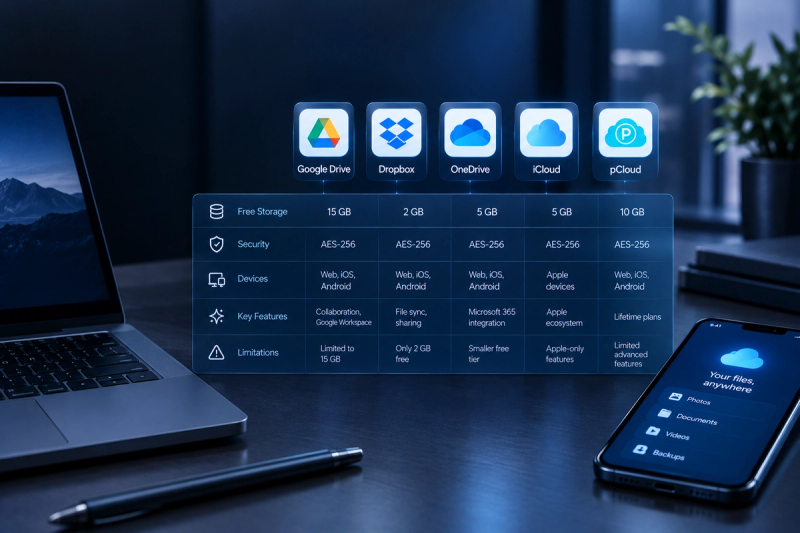
| Service | Free storage | Shared with | Best for |
|---|---|---|---|
| MEGA | 20GB | Nothing else | Most free space, privacy, end-to-end encryption |
| Google Drive | 15GB | Gmail + Google Photos | Google Workspace users, collaboration |
| pCloud | 10GB | Nothing else | Lifetime plan option, clean apps |
| Icedrive | 10GB | Nothing else | Modern interface, fast sync |
| Proton Drive | 5GB | ProtonMail (shared) | Privacy-first, Swiss jurisdiction, open source |
| OneDrive | 5GB | Email + device backup | Windows users, Microsoft 365 integration |
| Dropbox | 2GB | Nothing else | Transfer speed, cross-platform sync |
| iCloud Drive | 5GB | iPhone backup + photos | Apple ecosystem users |
1. MEGA — Most Free Storage (20GB)
Free storage: 20GB | Encryption: End-to-end on free tier | Max file size: 16GB
MEGA is the most generous free cloud storage service in 2026. Twenty gigabytes of dedicated storage — shared with nothing else — with end-to-end encryption enabled on the free tier at no cost. That means MEGA cannot read your files even if it wanted to. For anyone storing sensitive documents, photos, or personal files, that’s a meaningful privacy advantage over Google Drive or OneDrive. The apps work well on Windows, Mac, iOS, and Android.
Catch: Free accounts have transfer bandwidth limits — if you download large files frequently you’ll hit a quota. Based in New Zealand; past ownership controversies are worth knowing if jurisdiction matters to you.
2. Google Drive — Best for Most People
Free storage: 15GB (shared) | Collaboration: Google Docs, Sheets, Slides | Sync speed: Fastest tested
Google Drive is the right default for most people — 15GB of free storage, the fastest sync speeds tested across any service, and direct integration with Google Docs, Sheets, and Slides for real-time collaboration at no cost. If you use Gmail, the 15GB is shared across email, photos, and Drive files. A clean inbox and Google Photos on backup-only mode helps preserve most of that space for actual file storage.
Catch: 15GB shared with Gmail and Google Photos fills faster than expected. Google scans file metadata for advertising purposes on the free tier.
3. pCloud — Best Free Tier to Grow Into
Free storage: 10GB | Lifetime plans: Yes (one-time payment) | Encryption: Optional add-on
pCloud gives you 10GB of dedicated free storage with clean apps across every platform and the unique option to upgrade to a lifetime paid plan rather than a recurring subscription. A one-time $250 payment gets you 2TB permanently — no annual renewal. For users who want to start free and scale up without committing to a monthly fee forever, pCloud is the smartest long-term choice in the free tier category.
Catch: End-to-end encryption is a paid add-on ($50 one-time), not included by default. 10GB is less than MEGA or Google Drive’s free allocation.
4. Proton Drive — Best for Privacy
Free storage: 5GB (shared with ProtonMail) | Jurisdiction: Switzerland | Encryption: Zero-knowledge, open source
Proton Drive is the most privacy-focused free cloud storage option in 2026. Swiss jurisdiction means it sits outside US and EU data sharing agreements. Zero-knowledge encryption means even Proton cannot read your files. The app is fully open source, allowing independent security audits. At 5GB shared with ProtonMail the free tier is the smallest on this list, but for users who treat data sovereignty as the primary criterion, no other free service comes close. Pair it with a password manager and two-factor authentication for the strongest free privacy stack available.
Catch: 5GB shared with ProtonMail email fills quickly. Fewer collaboration features than Google Drive. Apps are functional but less polished than pCloud or Icedrive.
5. Microsoft OneDrive — Best for Windows Users
Free storage: 5GB | Integration: Windows, Microsoft 365 | Shared with: Device backup, email
OneDrive is built into Windows and pre-configured to back up your Desktop, Documents, and Pictures folders automatically. For Windows users who have never changed the defaults, OneDrive is almost certainly already storing their files. The free 5GB is the smallest allocation of any mainstream service, and Windows backup consumes it quickly. The real value is Microsoft 365 integration: if you pay for Microsoft 365 you get 1TB of OneDrive storage included. For free-only users, 5GB is enough for documents but not photos or videos.
Catch: 5GB goes quickly with Windows automatic backup enabled. You may be using more OneDrive than you realise if you’ve never checked your Windows backup settings.
What “Free” Cloud Storage Actually Gets You in 2026
The single most important thing to understand before choosing a free plan is what else shares that storage. Google’s 15GB fills faster than most people realise because every Gmail attachment and every Google Photos upload counts against it. OneDrive’s 5GB shrinks the moment Windows automatic backup turns on. iCloud’s 5GB disappears almost immediately for iPhone users because iPhone backups are stored there by default. MEGA and pCloud’s free tiers are dedicated storage — nothing else shares them — which is why 10–20GB of dedicated storage is more useful than 15GB of shared storage in most real-world situations.
How Much Free Cloud Storage Do You Actually Need?
| Storage amount | What it holds | Enough for? |
|---|---|---|
| 5GB | ~1,000–1,500 photos (JPEG) or ~2,500 documents | Light document storage only |
| 10GB | ~2,000–3,000 photos or ~5,000 documents | Personal files and photos if no video |
| 15GB | Several thousand photos + some short videos | Most personal users if managed carefully |
| 20GB | ~4,000 photos or ~20 minutes of 4K video | Families or users with larger media libraries |
Which Free Cloud Storage Should You Use?
| You need… | Use this |
|---|---|
| Most free space, no strings | MEGA (20GB dedicated) |
| Google Docs/Sheets collaboration | Google Drive (15GB) |
| Best privacy, Swiss jurisdiction | Proton Drive (5GB) |
| Windows / Microsoft 365 integration | OneDrive (5GB) |
| Free tier + lifetime upgrade option | pCloud (10GB) |
| iPhone and Mac users | iCloud Drive (5GB) + upgrade to 50GB at $0.99/mo |
The Verdict: Best Free Cloud Storage in 2026
MEGA is the best free cloud storage in 2026 for most people — 20GB of dedicated storage with end-to-end encryption at no cost beats every other free tier on raw value. Google Drive is the better choice if you work in Google Docs or need fast collaboration tools. Proton Drive is the pick if privacy and data sovereignty come first. pCloud is the smart choice for anyone planning to eventually upgrade without committing to a subscription.
If you need more than any free tier provides, see our full best cloud storage services compared guide covering paid plans. For a head-to-head between the two most popular options, see our OneDrive vs Google Drive comparison. And if you want to make sure your cloud files are fully protected, see our guide on the best way to backup your computer.