Best Antivirus Software in 2026: Free and Paid Options Ranked
Best antivirus software in 2026 — Bitdefender, Norton, Microsoft Defender, Malwarebytes and ESET ranked by protection, price, and who actually needs to pay.
The threat landscape has changed. The FBI reported Americans lost $20.9 billion to online scams in 2025. Most of those scams arrived as phishing emails, AI-generated text messages, and fake customer support chats — not traditional viruses. In 2026, antivirus software has expanded to cover all of that, and the right choice depends heavily on whether you need to pay at all. If you run Windows 11, Microsoft Defender is already installed and genuinely good. If you need more, this guide tells you exactly what to add and why.
Best Antivirus Software 2026: Quick Comparison
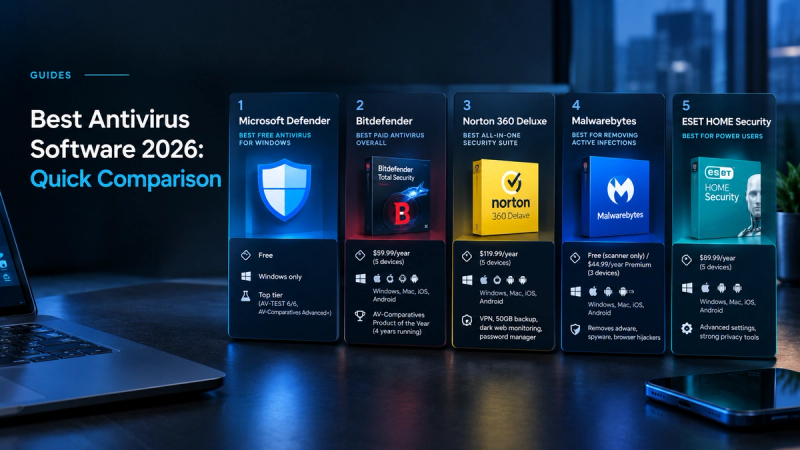
| Antivirus | Price (first year) | Devices | Best for |
|---|---|---|---|
| Microsoft Defender | Free | 1 (Windows) | Best free — already on your PC, top lab scores |
| Bitdefender Total Security | $59.99/year | 5 | Best overall paid — top detection, lightest footprint |
| Norton 360 Deluxe | $119.99/year | 5 | Best all-in-one — VPN + backup + dark web monitoring |
| Malwarebytes Premium | $44.99/year | 3 | Best for removing active infections |
| ESET HOME Security | $39.99–$44.99/year | 1–10 | Best for power users — low footprint, advanced controls |
| McAfee+ | $49.99/year | Unlimited | Best for families — unlimited devices, identity tools |
| Avast One | Free / paid from $35.88/year | 1+ | Best free with extras — Wi-Fi scanner, sandbox |
| TotalAV | $19/year (intro) | 3 | Budget pick — cheapest entry with decent extras |
1. Microsoft Defender — Best Free Antivirus for Windows
Price: Free | Platform: Windows only | Lab scores: Top tier (AV-TEST 6/6, AV-Comparatives Advanced+)
Microsoft Defender is built into every Windows 10 and Windows 11 PC and requires no installation, no subscription, and no configuration. It runs real-time protection, scans downloads automatically, and integrates with Windows Security for firewall, device health, and account protection. In 2026 independent lab testing by AV-TEST and AV-Comparatives, Defender consistently earns top scores in both protection and performance categories. For the majority of Windows users who browse carefully, don’t pirate software, and don’t open suspicious email attachments, Defender is enough.
Limitation: Windows only. No VPN, password manager, or identity monitoring. Weaker phishing protection than paid suites. If you regularly download files from the internet or use public Wi-Fi without a VPN, a paid option adds meaningful coverage.
2. Bitdefender Total Security — Best Paid Antivirus Overall
Price: $59.99/year (5 devices) | Platforms: Windows, Mac, iOS, Android | Lab scores: AV-Comparatives Product of the Year 4 years running
Bitdefender Total Security is the most consistently recommended paid antivirus in 2026 across every major independent review. It wins AV-Comparatives Product of the Year for the fourth consecutive year, meaning it leads on malware detection, false positives, and system performance simultaneously. Most antivirus tools improve detection by using more system resources — Bitdefender achieves near-perfect scores while keeping CPU and RAM impact lower than any competitor tested.
The Total Security plan at $59.99/year covers 5 devices across Windows, Mac, iOS, and Android. It includes ransomware protection, a secure browser for banking, a basic VPN (200MB/day limit), and a password manager. The VPN limit makes it unsuitable as a primary VPN — pair it with a dedicated VPN if that’s a requirement. A free version is available for Windows with core protection only.
Limitation: VPN capped at 200MB/day on the base plan. First-year price is promotional — renewal is typically higher. Weak iOS app due to Apple platform restrictions.
3. Norton 360 Deluxe — Best All-in-One Security Suite
Price: $119.99/year (5 devices) | Platforms: Windows, Mac, iOS, Android | Includes: VPN, 50GB cloud backup, dark web monitoring, password manager
Norton 360 Deluxe is the right choice if you want a single subscription that covers antivirus, a no-logs VPN with no data cap, 50GB of cloud backup, dark web monitoring for your email addresses, and a password manager in one package. Each of those features is available cheaper separately, but for users who want one bill and one dashboard, Norton’s bundle is the most complete. The 2026 Genie Scam Detector addition — an AI tool that scans messages and emails for scam behaviour — is particularly relevant given the current threat environment.
Limitation: $119.99/year is the most expensive on this list. Each individual feature (VPN, password manager, backup) is available separately at lower cost if you only need one.
4. Malwarebytes — Best for Removing Active Infections
Price: Free (scanner only) / $44.99/year Premium (3 devices) | Platforms: Windows, Mac, iOS, Android
Malwarebytes occupies a different category to the others on this list. It is the tool you reach for when something has already gone wrong — when your browser is behaving strangely, ads are appearing where they shouldn’t, or your PC is running inexplicably slowly. The free scanner identifies and removes active infections including adware, spyware, and browser hijackers that traditional antivirus sometimes misses. Many IT professionals run Malwarebytes Free alongside Microsoft Defender rather than instead of it, using Defender for real-time prevention and Malwarebytes as a second-opinion scanner.
Limitation: Free version is scanner only — no real-time protection. Premium at $44.99/year adds real-time blocking. Not a full replacement for Bitdefender or Defender as a primary security tool.
5. ESET HOME Security — Best for Power Users
Price: $39.99–$44.99/year | Platforms: Windows, Mac, iOS, Android | Lab scores: AV-Comparatives #1, near-perfect AV-TEST scores
ESET ranks #1 in AV-Comparatives testing in 2026 and delivers advanced controls that most consumer antivirus hides. Network inspector, botnet protection, exploit blocker, and a UEFI scanner (which checks for firmware-level malware that survives factory resets) are available to users who want them. ESET is also the lightest antivirus on system resources after Bitdefender — relevant for older PCs or users running resource-intensive workloads. No free tier is available.
Limitation: No free version. Interface is less beginner-friendly than Bitdefender or Norton. Advanced features require knowing what they do to be useful.
Do You Actually Need Antivirus Software in 2026?
Windows users: Microsoft Defender handles the basics. You need a paid antivirus if you regularly download files from non-official sources, use public Wi-Fi frequently, or want phishing protection, dark web monitoring, or a VPN bundled in. Mac users: macOS has strong built-in security (Gatekeeper, XProtect, Notarization), but Mac-specific malware has increased year-on-year since 2022. A lightweight option like Bitdefender or Avira Free adds a meaningful extra layer without slowing the system. Mobile (iOS/Android): iOS’s sandboxed app model means traditional antivirus can’t scan apps — mobile “antivirus” on iPhone is mostly a VPN and phishing URL blocker. Android is more exposed, particularly if you sideload apps outside the Play Store.
Best Free Antivirus Options in 2026
| Free antivirus | Platform | What’s free | How it’s funded |
|---|---|---|---|
| Microsoft Defender | Windows only | Full real-time protection | Built into Windows — no monetisation |
| Bitdefender Free | Windows only | Core AV, no extras | Upsell to paid tiers |
| Avast One Free | Windows, Mac, Android | AV + Wi-Fi scan + sandbox | Data collection (opt-out available) |
| Avira Free | Windows, Mac, Android, iOS | AV + URL scanner | Upsell to paid tiers |
| Malwarebytes Free | Windows, Mac, Android, iOS | On-demand scanner only (no real-time) | Upsell to Premium |
The Verdict: Which Antivirus Should You Get in 2026?
If you’re on Windows and use your PC carefully: Microsoft Defender is free, built-in, and good enough. If you want the best paid protection with minimal system impact: Bitdefender Total Security at $59.99/year is the clear answer. If you want one subscription that covers everything including a full VPN and backup: Norton 360 Deluxe. If something is already wrong with your PC: download Malwarebytes Free and run a scan first.
Antivirus is one layer of a complete security setup. Pair it with a password manager and two-factor authentication on every account. For additional privacy on public Wi-Fi, see our guide to what a VPN is and whether you actually need one.